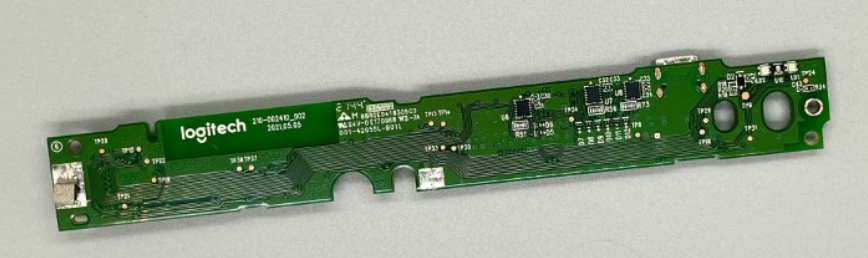
Motherboard MX Keys AZERTY (FR) — PC
Spare parts
In stock
Not sure?
Not sure this is the right key, or have another question? Ask us on the chat, we'll reply as soon as possible.
Ask a questionSpecifications
- Category
- Spare parts
Overview
Motherboard MX Keys AZERTY (FR) — PC is the original Logitech board pulled from a retired full-size MX Keys: the circuit carrying the controller, the key matrix, the radio module (Bluetooth and Logi Bolt) and the USB-C charging circuitry. It is the part to change when the keyboard no longer powers on, is no longer recognised, keeps losing its wireless link, or leaves whole zones of keys silent — not a keycap, not a hinge.
Compatibility
It fits any full-size MX Keys, whatever layout the keyboard uses. The layout is not baked into the board: characters are decided by the operating system, so setting the keyboard language after the swap leaves a QWERTY keyboard a QWERTY keyboard. The chassis, however, does have to match — an MX Keys Mini has neither the same dimensions nor the same ribbon cable, and the PC and Mac versions are not interchangeable.
When to replace the board
Three symptoms point to it: a keyboard completely dead after ten minutes on USB-C with a known-good cable; a Bluetooth or Logi Bolt link that stays unstable after re-pairing and updating Logi Options+; entire rows that no longer respond while the keys themselves are sound. A single dead key almost always comes from the mechanism under the cap instead.
How to fit it
This is a full teardown, not a clip-in repair. Peel off the rubber feet under the keyboard: the case screws are hidden beneath them. Undo those screws, then work an opening pick around the edge — Logitech assembles the shell with internal clips and perimeter adhesive. Unseat the ZIF ribbon connectors carefully before fitting the new board. Photograph each step for reassembly. If you would rather not open the keyboard, write to us: we can do it as a workshop return.
Frequently asked questions
- Does this board work if my keyboard is not AZERTY?
- Yes. The board holds no layout at all: your operating system maps a character to each position. After the swap, set the keyboard language in your system preferences and your full-size MX Keys goes back to exactly the layout it had — QWERTY US, QWERTY UK or any other.
- Will it fit an MX Keys Mini?
- No. That is the one real limit of this part: the two chassis share neither the board outline nor the ribbon cable. Check your keyboard's exact model before ordering.
- Do I need to re-pair the keyboard afterwards?
- Yes. The radio module changes along with the board, so the keyboard shows up as a new device. Re-pair it over Bluetooth, or re-pair the Logi Bolt receiver with Logitech's utility, then check USB-C charging before closing the shell.